DEV Partnerships Setup Guide & Best Practices
Everything you need to know about creating effective ads on DEV
Overview
Welcome to the DEV advertising platform guide. This comprehensive resource will help you understand how to create effective ads, where they appear, and how to maximize your campaign's performance.
Quick Start
Get your first ad campaign up and running in minutes
Best ROI
Target developers and technical decision makers effectively
Full Control
Manage budgets, targeting, and creative assets with ease
Where Ads Appear
DEV displays ads in strategic locations throughout the platform to maximize visibility while maintaining a positive user experience.
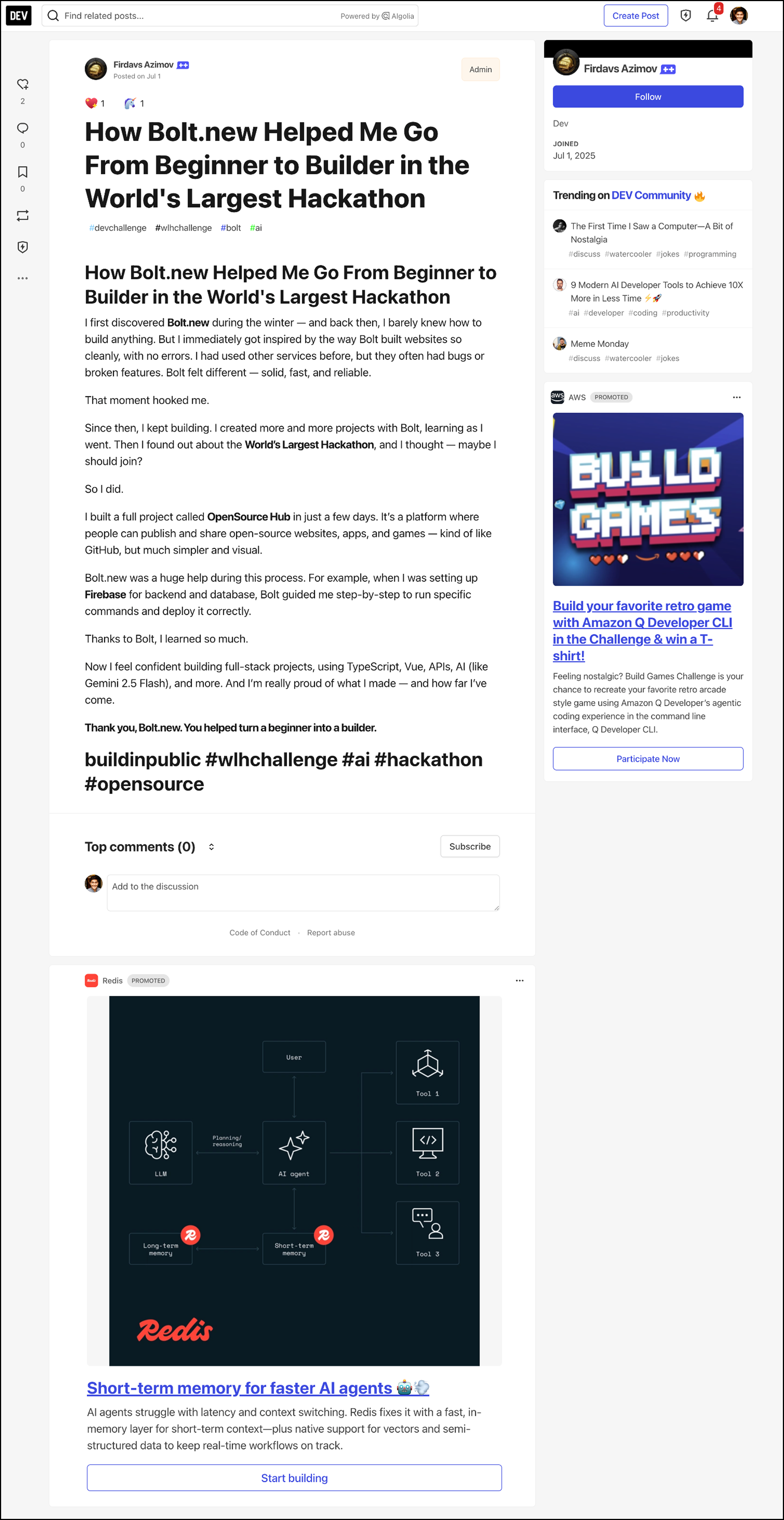
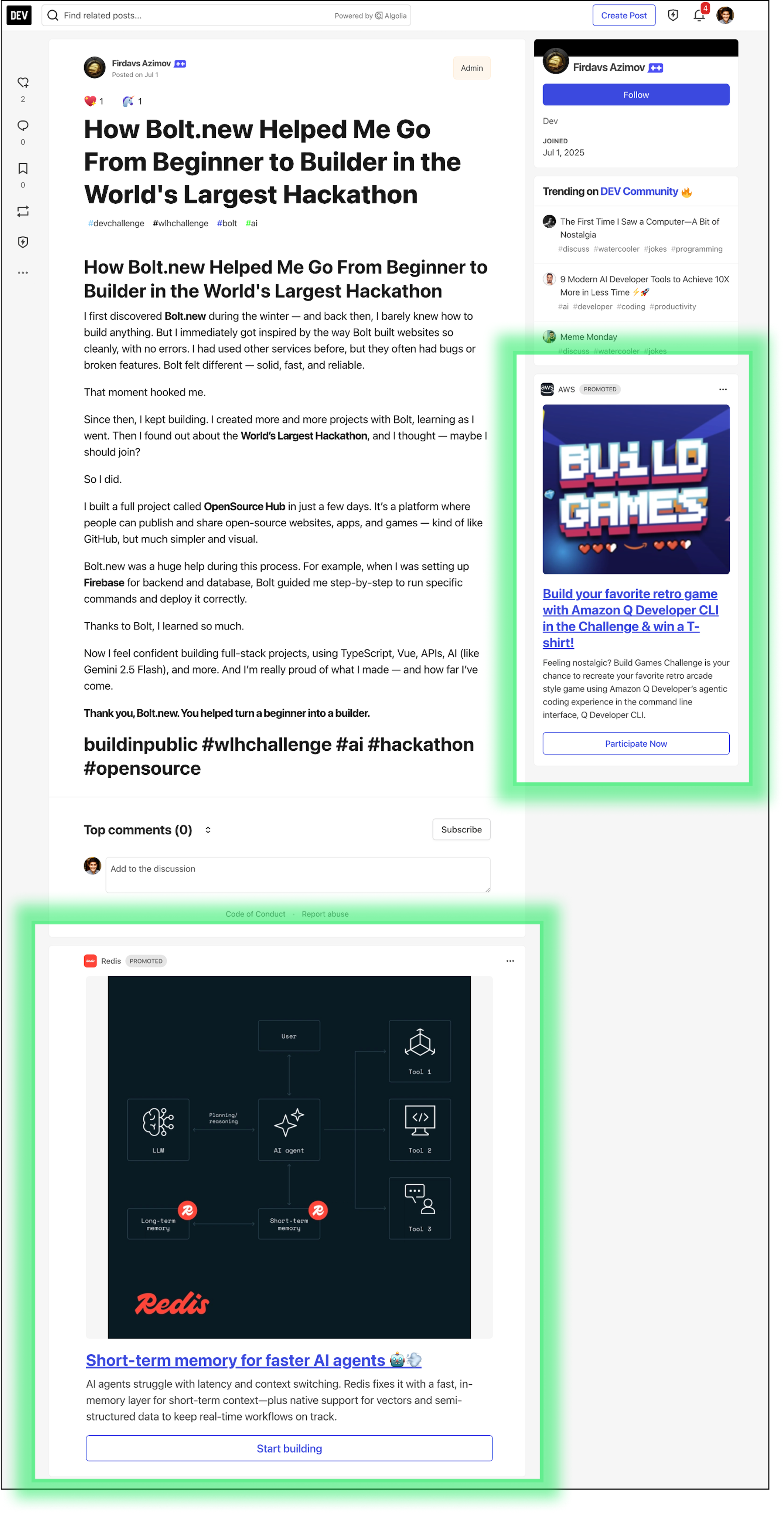
Setup & Approval
Getting started is straightforward. Here's what to expect:
Create Your Campaign
Set up targeting, budget, and upload creative assets
Quick Review
Our team ensures quality and relevance for the developer community
Go Live
Once approved, your ads start reaching developers immediately
How Distribution Works
Our distribution system ensures your ads reach the right audience at the right time.
Distribution Factors
Targeting (Tags)
Reach developers by relevant content tags (e.g., javascript, python, webdev)
Budget Pacing
Your daily budget is distributed evenly throughout the day
Performance
Higher performing ads get more distribution automatically
Metrics & Click Measurement
Track your campaign performance with comprehensive analytics.
Key Metrics
Impressions
Number of times your ad is displayed to users across the platform
Clicks
Number of times users click on your ad to visit your target URL
CTR (Click-Through Rate)
The percentage of impressions that result in clicks (Clicks ÷ Impressions)
Measure Offsite Performance with UTM Parameters
Full visibility, complete privacy. Track conversions, measure ROI, and optimize your campaigns using UTM parameters in your own analytics tools. No tracking pixels, no third-party scripts, just clean data that respects developer privacy while giving you the insights you need.
Technical Details
- Our ad tracking system is open source
- Designed for accuracy while respecting privacy + preferences
- We count an impression when:
- At least 25% of the ad is visible in the user's viewport
- The ad remains visible for at least 200 milliseconds
- We count a click when:
- A user actually interacts with an ad by clicking on a link within it.
- We've implemented several quality assurance features:
- Bot Traffic Filtering: We automatically detect and filter out traffic from known web crawlers and bots, so they don't consume your impression allocation
- Ad Blocker Awareness: If a user has an ad blocker enabled, no impressions are recorded since the ad wouldn't be displayed to them
- User Preference Respect: Our system respects user preferences regarding sponsored content
Best Practices
Content Tips
- Lead with value: Put your main benefit in the headline
- Be specific: Use numbers, data, and concrete examples
- Speak developer language: Focus on technical benefits, not marketing fluff
- Show, don't tell: Use code snippets or screenshots when relevant
Design & Copy
- High contrast: Ensure text is readable and large enough on both light and dark themes
- Clear CTAs: Use action verbs that tell users exactly what happens next
- Visual hierarchy: Make your headline stand out, support with compelling image
- Test everything: Try different headlines, images, and CTAs to see what resonates
Developer Psychology & Ad Categories
Understanding what developers respond to (and what they avoid) is crucial for creating effective ads.
What Developers Dislike
Corporate/Sales-y Language
Avoid buzzwords, marketing fluff, and overly promotional language. Be authentic and technical.
Fluffy Words
Skip vague terms like "revolutionary" or "game-changing". Be specific about what your product does.
Distracting Ads
Avoid animations, auto-play videos, or anything that disrupts the reading experience.
Effective Ad Categories
Technical Images with Code
Show actual code snippets, terminal outputs, or architecture diagrams that developers can learn from.
Educational Content
Tutorials, how-tos, and teaching materials that provide immediate value and learning opportunities.
Developer Memes
Humor that resonates with coding experiences, debugging frustrations, and developer culture.
Social Proof
Show adoption by respected companies, GitHub stars, or testimonials from known developers.
Productivity & Career
Tools and resources that help developers work more efficiently or advance their careers.
New Technologies
Emerging frameworks, languages, and tools that developers want to learn and experiment with.
Gallery & Inspiration
Explore successful ad examples and get inspired for your next campaign. Each example showcases different approaches to capturing developer attention.
Why This Ad Works
- Action-oriented headline: "Save time" creates immediate value proposition
- Contextual visual: Shows the tool in a real developer environment
- Specific benefits: Mentions exact tools (Cursor, Heroku) developers use
- Clear CTA: "Learn More" is low-commitment and educational


Save time with this productivity hack.
See how Heroku MCP Server connects tools like Cursor to Heroku, so you can build, deploy, and manage apps—right from your editor.
Why This Ad Works
- Working memory focus: "Designed for your working memory" speaks directly to developers who struggle with cognitive overload from juggling multiple tasks and ideas
- Authority endorsement: The StackOverflow quote provides third-party validation, describing it as a "second brain" for busy developers
- Context preservation: Promises to "retain those stray thoughts" addresses the common pain of losing valuable insights when switching between tasks
- Future value proposition: "Add up to something big later on" emphasizes the long-term productivity gains from capturing fleeting ideas


A note-taking app designed for your working memory.
"... a second brain for busy developers that helps them stay focused and retain those stray thoughts that can add up to something big later on"
-Stackoverflow
Why This Ad Works
- Open source appeal: Leading with "Open Source" immediately signals free access and community-driven development
- Comprehensive solution: "ERP / CRM" with specific modules (Invoice/Inventory/Accounting/HR) shows all-in-one business functionality
- Modern tech stack: Highlighting MERN stack, React.js, and Ant Design appeals to developers familiar with these popular technologies
- GitHub engagement: Direct link to repo with star request builds community and shows transparency in development


Open Source ERP CRM based on Node.js React.js
IDURAR is Open Source ERP / CRM (Invoice / Inventory / Accounting / HR) Based on Advanced Mern Stack (Node.js / Express.js / MongoDb / React.js ) with Ant Design (AntD) and Redux
Github Repo : https://github.com/idurar/erp-crm
Don't forget to give a ⭐️ to this project ... Happy coding! 🤩
Why This Ad Works
- Open-source credibility: "SWIRL is Open Source" immediately builds trust with developers who value transparency and community-driven projects
- AI-powered value proposition: Combining search with AI insights addresses the growing need for intelligent data exploration
- Clear brand identity: The star emoji in the CTA creates a memorable, action-oriented call to explore their GitHub repository
- Simplicity in messaging: Short, punchy copy that gets straight to the point without overwhelming technical details


SWIRL is Open Source
Swirl is an open-source search platform with AI.
You can search your data and generate AI-powered insights with GPT or other LLMS. Check Swirl on GitHub today.
Why This Ad Works
- Personalized positioning: "A Workflow Copilot. Tailored to You." emphasizes customization, suggesting the tool adapts to individual developer workflows
- Visual problem-solving: Highlighting "extracting code from screenshots" addresses a unique use case where developers share code visually in Slack, forums, or documentation
- AI integration focus: Positions copilot features prominently, capitalizing on the current AI development trend while grounding it in practical workflow benefits
- Comprehensive tooling: "Streamlines coding" with multiple features (snippets, screenshot extraction, problem-solving) shows it's not just another code snippet manager

A Workflow Copilot. Tailored to You.

Our desktop app, with its intelligent copilot, streamlines coding by generating snippets, extracting code from screenshots, and accelerating problem-solving.
Why This Ad Works
- Pain point headline: "Eliminate Context Switching" directly addresses the #1 productivity killer for developers, making the value proposition immediately clear
- Integration emphasis: "Working alongside your favorite apps" reassures developers they don't need to abandon their existing tool stack
- Repository-level intelligence: "Ask questions about entire repositories" elevates it beyond simple snippet management to comprehensive codebase understanding
- End-to-end workflow: From generating code to saving snippets to streamlining processes, it presents a complete development workflow solution
Eliminate Context Switching and Maximize Productivity

Pieces Copilot is your personalized workflow assistant, working alongside your favorite apps. Ask questions about entire repositories, generate contextualized code, save and reuse useful snippets, and streamline your development process.
Why This Ad Works
- Performance guarantee: "100% of your server's resources dedicated solely to you" provides concrete assurance of exclusive resource allocation, eliminating concerns about noisy neighbors
- Growth-oriented positioning: "Growing Tech Projects" targets scale-ups and established businesses ready to move beyond shared hosting, identifying the exact audience need
- Vendor independence: "No vendor lock-in" addresses a critical concern for technical decision-makers who value flexibility and avoid proprietary infrastructure dependencies
- Direct value proposition: Combines dedicated resources with business app deployment, making it clear this is infrastructure for production workloads, not experiments


Dedicated Servers for Growing Tech Projects
Deploy your business apps, with 100% of your server's resources dedicated solely to you. No vendor lock-in.
Why This Ad Works
- Developer-friendly humor: The self-deprecating "not bad" tagline resonates with developers who appreciate honest, unpretentious messaging
- Pain point focus: "Fixing code doesn't have to be the worst part of your day" directly acknowledges the frustration of debugging
- Social proof with scale: "4M developers" provides credibility while the casual tone keeps it approachable
- Visual simplicity: Clean, minimalist design with bold colors reflects modern developer tools aesthetic


See why 4M developers consider Sentry, "not bad."
Fixing code doesn't have to be the worst part of your day. Learn how Sentry can help.
Why This Ad Works
- Proactive monitoring promise: "Never miss a downtime" addresses the core fear of reliability engineers and DevOps teams
- Tool integration clarity: Specifically mentions Playwright tests, showing developers they can use familiar testing tools for monitoring
- Framework flexibility: Lists popular frameworks (NextJS, Astro, Remix) to show broad compatibility without being overwhelming
- Action-oriented CTA: "Get started now!" creates urgency while the exclamation point adds energy to drive immediate action


Never miss a downtime
With Checkly, you can use Playwright tests and Javascript to monitor end-to-end scenarios in your NextJS, Astro, Remix, or other application.
Why This Ad Works
- Conversational headline: "Ask anything. Get answers." uses natural language to make AI search feel approachable and intuitive
- Data ownership emphasis: "SWIRL knows your data" addresses privacy concerns by highlighting local data control
- Workplace-focused positioning: Clearly targets enterprise users with "for your workplace" messaging
- Action-oriented CTA: "Try SWIRL on GitHub" directs developers to familiar platform for immediate exploration

Why This Ad Works
- Technical credibility: Leading with specific technologies (pgai Vectorizer, SQLAlchemy, LiteLLM) establishes expertise
- Simplification promise: "Make Vector Search Simple" addresses complexity concerns in AI/ML development
- Social proof with metrics: "3,000 vectorizers on Timescale Cloud" provides concrete adoption numbers
- Infrastructure benefits: "Without needing a separate database or complex infrastructure" highlights practical advantages for developers


🚀 pgai Vectorizer: SQLAlchemy and LiteLLM Make Vector Search Simple
We built pgai Vectorizer to simplify embedding management for AI applications—without needing a separate database or complex infrastructure. Since launch, developers have created over 3,000 vectorizers on Timescale Cloud, with many more self-hosted.
Why This Ad Works
- Educational value proposition: Offering an eBook positions Datadog as a thought leader while providing immediate value
- Specific use case targeting: "AWS container environments at scale" speaks directly to enterprise DevOps challenges
- Partnership credibility: Co-authorship with AWS adds significant authority and trust to the content
- Visual complexity handling: The clean diagram visualization makes complex container orchestration concepts approachable


Learn how to monitor AWS container environments at scale
In this eBook, Datadog and AWS share insights into the changing state of containers in the cloud and explore why orchestration technologies are an essential part of managing ever-changing containerized workloads.
Why This Ad Works
- Visual storytelling: The image shows real code transformation in action, making the AI capabilities tangible and immediately understandable
- Personal connection: "Meet your AI code assistant" personifies the tool as a collaborative partner rather than just software
- Brand authority: AWS branding provides enterprise credibility while the clean design maintains developer appeal
- Minimal text approach: Lets the visual demonstration speak for itself, respecting developers' preference for seeing tools in action


Why This Ad Works
- Developer-centric imagery: The laptop with code editor creates an immediate connection with the target audience's daily workflow
- Consistent messaging: Maintains the "Meet your AI code assistant" theme for brand recognition across campaigns
- Professional aesthetic: Clean, modern design with AWS branding signals enterprise-ready AI capabilities
- Direct value communication: The CTA focuses on the personal benefit ("your" assistant) rather than features, making it more compelling

Note: These are placeholder examples. Each ad demonstrates different approaches to messaging, visual design, and call-to-action strategies that resonate with developers.